How to Supercharge Microsoft Purview DLP and Make Copilot Safe by Fixing Labels at the Source
.webp)

For organizations invested in Microsoft 365, Purview and Copilot now sit at the center of both data protection and productivity. Purview offers rich DLP capabilities, along with sensitivity labels that drive encryption, retention, and policy. Copilot promises to unlock new value from content in SharePoint, OneDrive, Teams, and other services.
But there is a catch. Both Purview DLP and Copilot depend heavily on labels and correct classification.
If labels are missing, wrong, or inconsistent, then:
- DLP rules fire in the wrong places (creating false positives) or miss critical data (worse!).
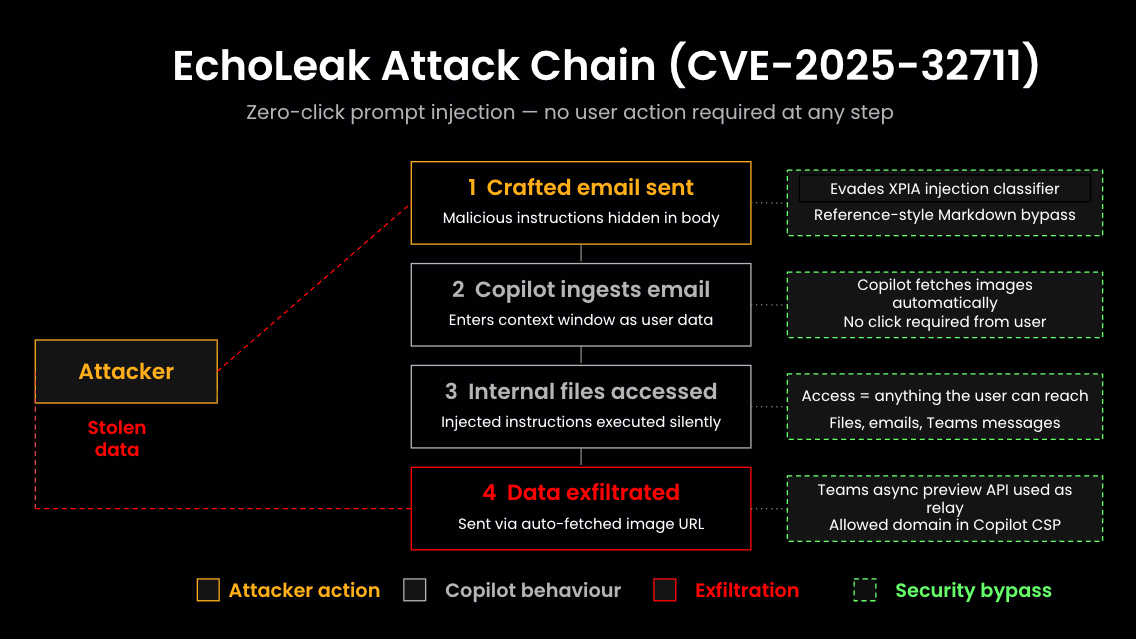
- Copilot accesses content you never intended it to see and can inadvertently surface it in responses.
In many environments, that’s exactly what’s happening. Labels are applied manually. Legacy content, exports from non‑Microsoft systems, and AI‑ready datasets live side by side with little or no consistent tagging. Purview has powerful controls, it just doesn’t always have the accurate inputs it needs.
The fastest way to boost performance of Purview DLP and make Copilot safe is to fix labels at the source using a DSPM platform, then let Microsoft’s native controls do the work they’re already good at.
The Limits of M365‑Only Classification
Purview’s built-in classifiers understand certain patterns and can infer sensitivity from content inside the Microsoft 365 estate. That can be useful, but it doesn’t solve two big problems.
First, PHI, PCI, PII, and IP often originate in systems outside of M365; core banking platforms, claims systems, Snowflake, Databricks, and third‑party SaaS applications. When that data is exported or synced into SharePoint, OneDrive, or Teams, it often arrives without accurate labels.
Second, even within M365, there are years of accumulated documents, emails, and chat history that have never been systematically classified. Applying labels retroactively is time‑consuming and error‑prone if you rely on manual tagging or narrow content rules. And once there, without contextual analysis and deeper understanding of the unstructured files in which the data lives, it becomes extremely difficult to apply precise sensitivity labels.When you add Copilot (or any AI agent/assistant) into the mix, any mislabeling or blind spots in classification can quickly turn into AI‑driven data exposure. The stakes are higher, and so is the need for a more robust foundation.
Using DSPM to Fix Labels at the Source
A DSPM platform like Sentra plugs into your environment at a different layer. It connects not just to Microsoft 365, but also to cloud providers, data warehouses, SaaS applications, collaboration tools, and AI platforms. It then builds a cross‑environment view of where sensitive data lives and what it contains, based on multi‑signal, AI‑assisted classification that’s tuned to your business context.
Once it has that view, Sentra can automatically apply or correct Microsoft Purview Information Protection (MPIP) labels across M365 content and, where appropriate, back into other systems. Instead of relying on spotty manual tagging and local heuristics, you get labels that reflect a consistent, enterprise‑wide understanding of sensitivity.
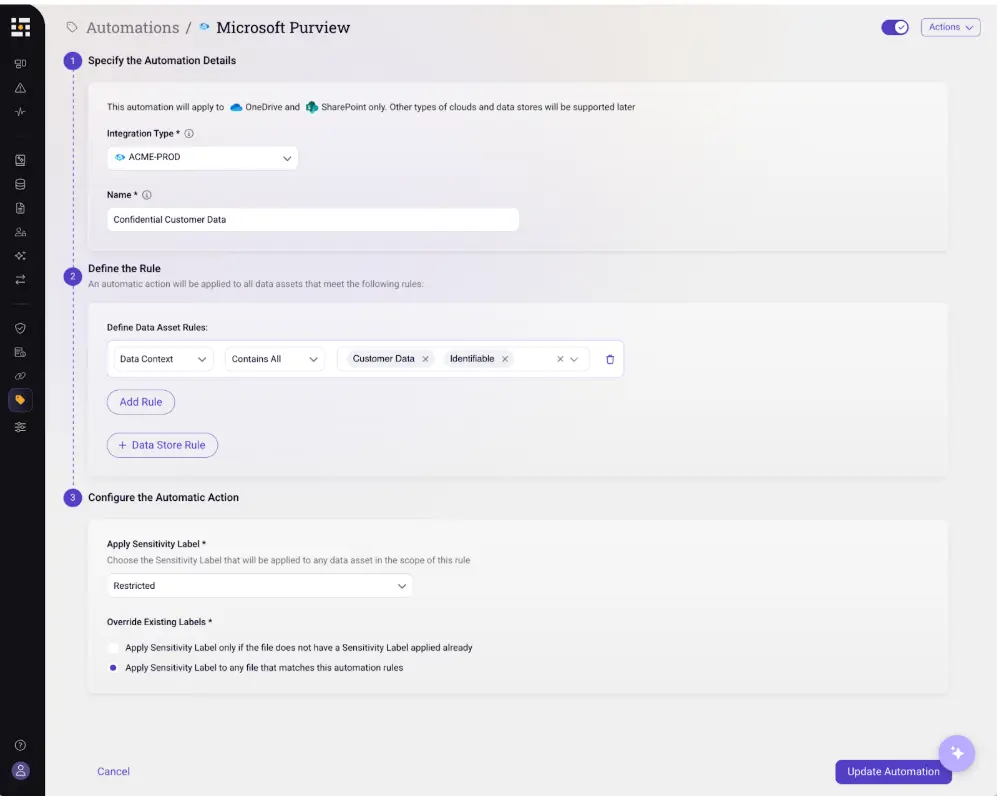
Those labels become the language that Purview DLP, encryption, retention, and Copilot controls understand. You are effectively giving Microsoft’s native tools a richer, more accurate map of your data, enabling them to confidently apply appropriate controls and streamline remediations.
Making Purview DLP Work Smarter
When labels are trustworthy, Purview DLP policies become easier to design and maintain. Rather than creating sprawling rule sets that combine patterns, locations, and exceptions, you can express policies in simple, label‑centric terms:
- “Encrypt and allow PHI sent to approved partners; block PHI sent anywhere else.”
- “Block Highly Confidential documents shared with external accounts; prompt for justification when Internal documents leave the tenant.”
DSPM’s role is to ensure that content carrying PHI or other regulated data is actually labeled as such, whether it started life in M365 or came from elsewhere. Purview then enforces DLP based on those labels, with far fewer false positives and far fewer edge cases. During rollout, you can run new label‑driven policies in audit mode to observe how they would behave, work with business stakeholders to adjust where necessary, and then move the most critical rules into full enforcement.
Keeping Copilot Inside the Guardrails
Copilot adds another dimension to this story. By design, it reads and reasons over large swaths of your content, then generates responses or summaries based on that content. If you don’t control what Copilot can see, it may surface PHI in a chat about scheduling, or include sensitive IP in a generic project update.
Here again, labels should be the control plane. Once DSPM has ensured that sensitive content is labeled accurately and consistently, you can use those labels to govern Copilot:
- Limit Copilot’s access to certain labels or sites, especially those holding PHI, PCI, or trade secrets.
- Restrict certain operations (such as summarization or sharing) when output would be based on Highly Confidential content.
- Exclude specific labeled datasets from Copilot’s index entirely.
Because DSPM also tracks where labeled data moves, it can alert you when sensitive content is copied into a location with different Copilot rules. That gives you an opportunity to remediate before an incident, rather than discovering the issue only after a problematic AI response.
A Practical Path for Microsoft‑Centric Organizations
For organizations that have standardized on Microsoft 365, the message is not “replace Purview” or “turn off Copilot.” It’s to recognize that Purview and Copilot need a stronger foundation of data intelligence to act safely and predictably.
That foundation comes from pairing DSPM and auto‑labeling with Purview’s native capabilities, which combined enable you to:
- Discover and classify sensitive data across your full estate, including non‑Microsoft sources.
- Auto‑apply MPIP labels so that M365 content is tagged accurately and consistently.
- Simplify DLP and Copilot policies to be label‑driven rather than pattern‑driven.
- Iterate in audit mode before expanding enforcement.
Once labels are fixed at the source, you can lean on Purview DLP and Copilot with much more confidence. You’ll spend less time chasing noisy alerts and unexpected AI behavior, and more time using the Microsoft ecosystem the way it was intended: as a powerful, integrated platform for secure productivity.
Ready to supercharge Purview DLP and make M365 Copilot safe by fixing labels at the source? Schedule a Sentra demo.
<blogcta-big>