Sentra MCP Server: AI-Driven Data Security Operations

The Gap Between Seeing and Doing
Data Security Posture Management has delivered on its promise of visibility. Organizations know where their sensitive data lives, which stores are misconfigured, and how many identities can reach their crown jewels. But a fundamental gap remains: the distance between seeing a security problem and resolving it is still measured in manual steps, context switches, and tribal knowledge.
Security teams spend disproportionate time on operational toil -- navigating dashboards, correlating data across screens, constructing API queries, and manually updating alert statuses. Every alert triage requires the same sequence of clicks. Every compliance audit requires the same series of exports. Every access review requires the same chain of lookups.
The Sentra MCP Server closes this gap by exposing the full breadth and depth of the Sentra platform through the Model Context Protocol (MCP), an open standard that enables AI agents to discover and call tools programmatically. This turns every security operation -- from a simple status check to a multi-step investigation with remediation -- into a natural language conversation.
Unlike read-only MCP implementations that provide a conversational interface to data catalogs, the Sentra MCP Server is a complete security operations platform. It reads, investigates, correlates, and acts. It chains multiple API calls into coherent workflows. And it does so with enterprise-grade safety controls that put security teams in command of what the AI agent can do.
Core thesis: AI-driven DSPM doesn't just tell you what's wrong -- it investigates, triages, and helps you fix it.
How It Works
The Sentra MCP Server sits between AI agents (Claude Desktop, Claude Code, Cursor, or any MCP-compatible client) and the Sentra API, translating natural language requests into precise API call chains.
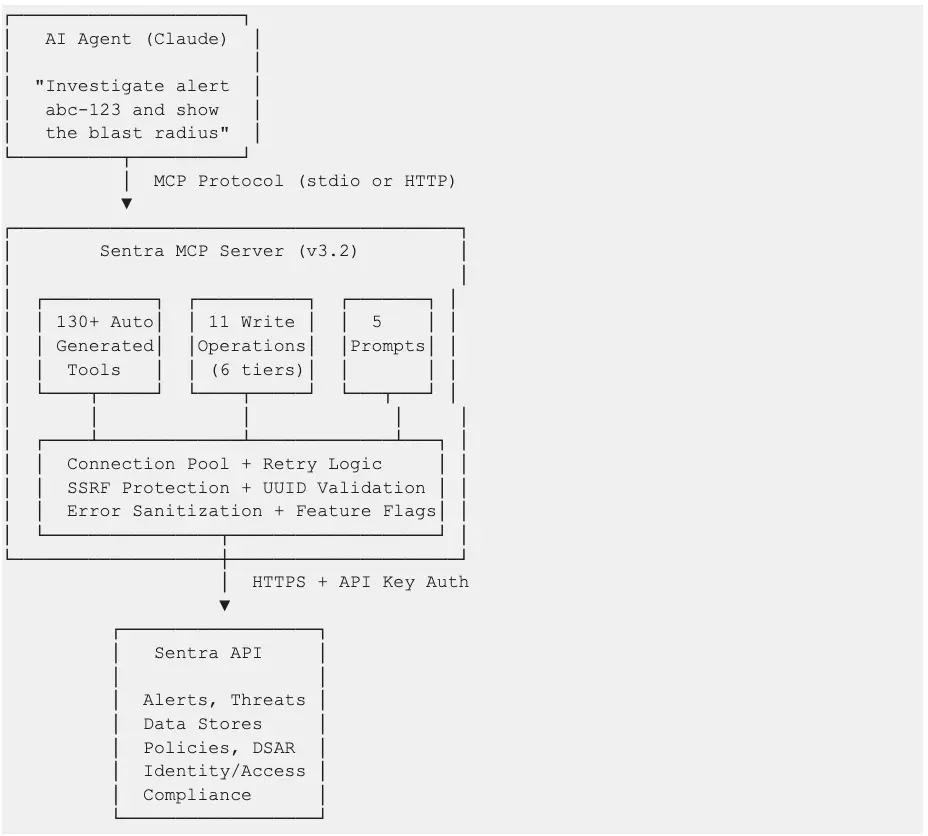
Architecture highlights:
- Auto-generated tools: The MCP server parses Sentra's OpenAPI specification at startup and dynamically creates tool wrappers using closures with inspect.Signature -- no code generation or exec() required. This means new API endpoints are automatically exposed as tools when the spec is updated.
- Unified request pipeline: All tools -- read and write -- flow through a shared HTTP client with connection pooling, automatic retry with exponential backoff for rate limits (429) and server errors (5xx), and consistent error handling.
- Safety-first write operations: Write tools are organized into a 6-tier hierarchy from additive-only to destructive, gated behind a feature flag, with UUID validation and explicit safety confirmations for high-risk operations.
Capability Deep Dive
Read Operations by Domain
The Sentra MCP Server exposes read operations across every domain of the Sentra platform:
Every tool includes enhanced descriptions that guide the AI agent on when to use it, what parameters to pass, how to construct filters, and what follow-up tools to chain for deeper investigation.
Write Operations: The 6-Tier Hierarchy
Write operations are the key differentiator. They transform the MCP server from a query interface into an operations platform. Each tier represents increasing impact and corresponding safety controls:
All 11 write tools are gated by the SENTRA_ENABLE_WRITE_OPS environment variable (default: enabled). Setting it to false completely removes all write tools from the MCP server, leaving a read-only interface.
Why this matters: Read-only MCP servers can tell you "this policy generates 200 low-severity alerts." The Sentra MCP Server can tell you that and then disable the policy and resolve its alerts -- in the same conversation.
Composite Investigation Tools
Two composite tools chain multiple API calls into single-invocation investigations:
`investigate_alert(alert_id)` -- Full alert triage in one call:
- Retrieves alert details (severity, policy, timestamps)
- Fetches affected data assets
- Gets alert status change history (recurring?)
- Pulls store context (type, region, owner, sensitivity)
- Maps accessible identities (blast radius)
`security_posture_summary()` -- Complete security overview:
- Dashboard summary metrics
- Open alerts aggregated by severity
- Overall security rating
- Compliance status across frameworks
- Risk distribution across data stores
- Sensitivity summary
These tools reduce what would be 5-6 sequential API calls into a single invocation, dramatically reducing latency and context window usage for the AI agent.
Guided Workflow Prompts
Five MCP prompts provide pre-built, step-by-step instructions that guide the AI agent through complex security workflows:
Prompts serve as expert runbooks encoded directly into the MCP server. A junior security analyst using these prompts follows the same investigation methodology as a senior engineer.
Use Cases
UC1: Quick Security Status Check
Persona: Security operations analyst starting their shift
Prompt:
"Show me all open alerts by severity and our current security rating."
Tools used: alerts_get_open_alerts_aggregated, alerts_get_risks_security_rating
Value: Instant situational awareness. No dashboard navigation, no login sequence. A 2-second question replaces a 5-minute morning routine.
UC2: Compliance Readiness Assessment
Persona: GRC analyst preparing for an upcoming HIPAA audit
Prompt:
"Prepare HIPAA compliance evidence: show our compliance score, all HIPAA-related controls and their status, any open violations, and data classification coverage for PHI across all data stores."
Tools used: alerts_get_frameworks_compliance_aggregation, alerts_get_framework_controls_mapping, alerts_get_all_external (filtered), data_insights_get_all (filtered for PHI), data_stores_get_all_external (filtered)
Value: Audit preparation that typically takes a full day compressed into a single conversational session. The output is structured for direct inclusion in audit evidence packages.
UC3: Alert Triage and Resolution
Persona: Security engineer responding to an overnight alert
Prompt:
"Investigate alert 7a3f9c21-4b8e-4d2a-9f1c-8e7d6a5b4c3d. Walk me through what happened, what data is at risk, who can access it, and whether this has happened before. If it's a false positive, resolve it and add a comment explaining why."
Tools used: investigate_alert (composite), alert_add_comment (write), alert_transition (write)
Value: End-to-end triage and resolution in one conversation. The composite tool gathers all context in a single call, and write operations close the loop -- no need to switch to the Sentra UI.
UC4: Identity Access Review
Persona: Security architect conducting a quarterly access review
Prompt:
"Show me all external identities with access to high-sensitivity data stores. For the identity with the broadest access, map the full access graph from identity to roles to stores to assets. Flag any stores with open alerts."
Tools used: search_identities (filtered), get_data_access_identities_by_id_accessible_stores, get_data_access_identities_by_id_graph, alerts_get_all_external (filtered per store)
Value: Access reviews that require correlating identity data, store sensitivity, role chains, and alert status -- all unified into a single investigation flow. The graph traversal reveals access paths that flat permission reports miss.
UC5: Policy Noise Reduction (Hero Example)
Persona: Security operations lead tuning policy configurations
Prompt:
"Audit all enabled security policies. For each, show how many open alerts it generates and its severity. Identify policies generating more than 50 low-severity alerts -- those are candidates for tuning. For the noisiest policy, show me sample violated assets so I can verify if it's misconfigured. Then disable that policy and resolve its existing alerts as false positives."
Tools used:
- policies_get_all -- Retrieve all enabled policies
- policies_get_policy_incidents_count -- Alert counts per policy
- alerts_get_all_external -- Alerts filtered to the noisiest policy
- alerts_get_violated_store_data_assets_by_alert -- Sample violated assets
- policy_change_status -- Disable the misconfigured policy (write)
- alert_transition -- Resolve existing alerts as false positives (write)
Value: This is the workflow that defines the difference between observing and operating. A read-only MCP server stops at step 4. Sentra's MCP server completes the full audit-to-remediation cycle, reducing policy noise that would otherwise consume analyst hours every week.
UC6: M&A Data Security Due Diligence
Persona: CISO assessing an acquisition target's data security posture
Prompt:
"We're acquiring Company X. Their AWS connector is 'companyX-aws-prod'. Give me a full data security due diligence report: all data stores in that account, sensitivity levels, open alerts and threats, access permissions, and compliance gaps. Flag anything that would be a deal risk."
Tools used: lookup_connector_by_name, data_stores_get_all_external (filtered), data_stores_get_store_asset_sensitivity, alerts_get_all_external (filtered), threats_get_all_external (filtered), get_data_access_stores_by_id_accessible_identities, alerts_get_frameworks_compliance_aggregation
Value: M&A due diligence that would require a dedicated workstream compressed into a structured assessment. The connector-scoped view ensures the analysis is precisely bounded to the acquisition target's infrastructure.
UC7: Board-Ready Security Briefing
Persona: CISO preparing for a quarterly board presentation
Prompt:
"Prepare my quarterly board security briefing: security rating trend over 90 days, current compliance status by framework, open alerts by severity with quarter-over-quarter comparison, data-at-risk trends, sensitivity summary, and top 5 prioritized recommendations."
Tools used: security_posture_summary (composite), alerts_get_risks_security_rating_trend, alerts_get_trends, alerts_get_data_at_risk_trends, data_stores_get_data_stores_aggregated_by_risk
Value: Board materials that tell a story: where we were, where we are, what we've improved, and what we need to prioritize next. The AI agent synthesizes data from 6+ tools into a narrative suitable for non-technical audiences.
UC8: AI Data Risk Assessment
Persona: AI governance lead assessing training data risk
Prompt:
"Show me all AI-related assets Sentra has discovered. For each, what sensitive data classes are present, who has access to the training data stores, and are there any open security alerts? Summarize the risk posture for our AI/ML workloads."
Tools used: get_all_ai_assets_api_data_access_ai_assets_get, get_ai_asset_by_id_api_data_access_ai_assets__asset_id__get, get_data_access_stores_by_id_accessible_identities, alerts_get_all_external (filtered)
Value: As organizations scale AI initiatives, visibility into what sensitive data feeds AI models becomes critical. This workflow surfaces PII, PHI, or proprietary data in training pipelines before it becomes a regulatory or reputational risk.
Prompt Showcase Gallery
The following prompts are designed to be used directly with any MCP-compatible AI agent connected to the Sentra MCP Server. Each demonstrates a complete workflow with the tools that fire behind the scenes.
Prompt 1: Full Alert Investigation with Remediation
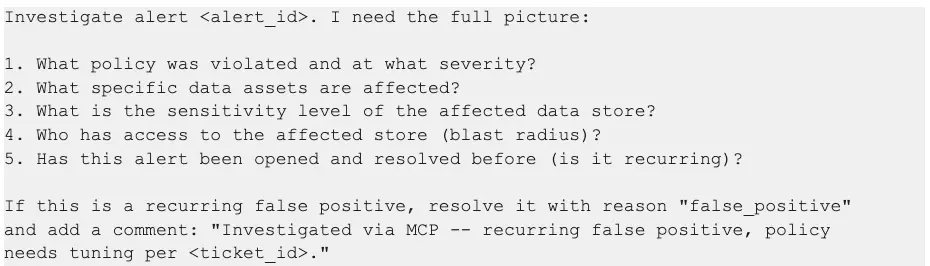
Tools that fire:
- alerts_get -- Alert details and policy info
- alerts_get_data_assets_by_alert -- Affected data assets
- data_stores_get_store -- Store details including sensitivity
- get_data_access_stores_by_id_accessible_identities -- Blast radius
- alertchangelog_get_alert_changelog_status_change_by_alert_id -- Recurrence check
- alert_transition -- Status change (write)
- alert_add_comment -- Investigation notes (write)
Expected output: A structured investigation report with severity assessment, impact analysis, blast radius, recurrence history, and confirmed remediation action.
Prompt 2: Compliance Audit Evidence Package
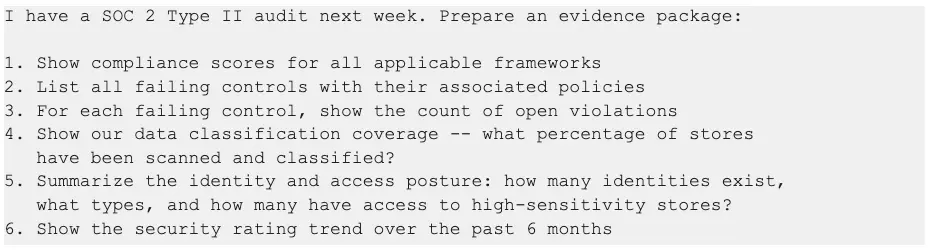
Tools that fire:
- alerts_get_frameworks_compliance_aggregation -- Framework scores
- alerts_get_framework_controls_mapping -- Control-level detail
- alerts_get_all_external -- Open violations by control
- get_coverage_metrics_api_scan_hub_visibility_coverage_get -- Scan coverage
- count_identities -- Identity totals
- search_identities -- Identity type breakdown
- alerts_get_risks_security_rating_trend -- Rating trend
Expected output: A multi-section evidence package with quantified compliance metrics, identified gaps, and trend data demonstrating continuous improvement.
Prompt 3: Identity Blast Radius Analysis
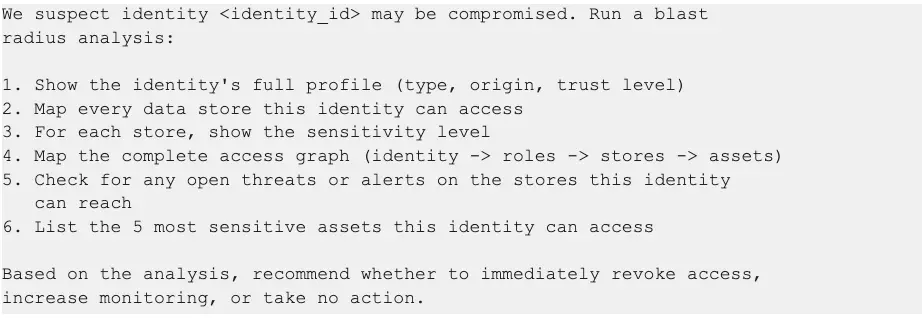
Tools that fire:
- get_identity_by_id_api_data_access_identities__identity_id__get -- Identity profile
- get_data_access_identities_by_id_accessible_stores -- Accessible stores
- data_stores_get_store_asset_sensitivity -- Per-store sensitivity
- get_data_access_identities_by_id_graph -- Full access graph
- threats_get_all_external -- Threats on accessible stores
- alerts_get_all_external -- Alerts on accessible stores
- get_data_access_identities_by_id_accessible_assets -- Top sensitive assets
Expected output: A risk-scored blast radius report with the identity's complete reach across the data estate, active threats in the blast zone, and a prioritized recommendation.
Prompt 4: Data Store Security Deep Dive
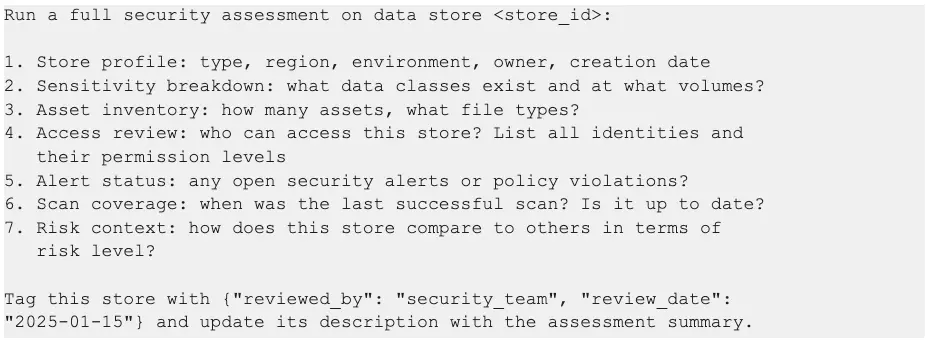
Tools that fire:
- data_stores_get_store -- Store profile
- data_stores_get_store_asset_sensitivity -- Sensitivity breakdown
- data_stores_get_store_assets_count -- Asset count
- datastorecontroller_getfileextensionsbydatastoreid -- File type breakdown
- get_data_access_stores_by_id_accessible_identities -- Identity access
- alerts_get_all_external -- Open alerts (filtered)
- data_stores_get_store_scan_status -- Scan status
- data_stores_get_data_stores_aggregated_by_risk -- Risk context
- data_store_update_custom_tags -- Apply review tags (write)
- data_store_update_description -- Update description (write)
Expected output: A comprehensive store security assessment with metadata updates applied directly to the store record for audit trail purposes.
Prompt 5: Weekly Security Operations Digest
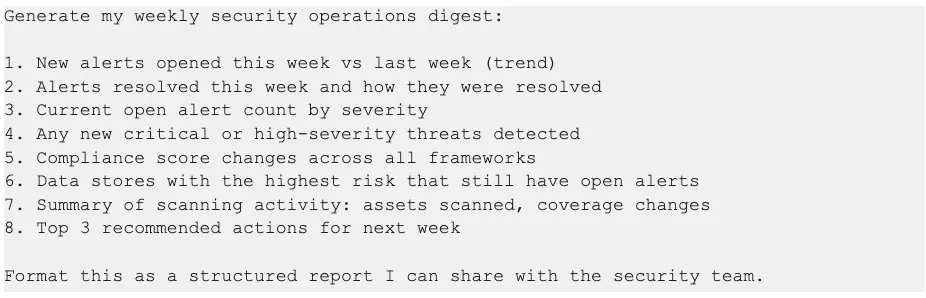
Tools that fire:
- alerts_get_trends -- Alert trend data
- alerts_get_open_alerts_aggregated -- Current severity breakdown
- threats_get_all_external -- Recent critical/high threats
- alerts_get_frameworks_compliance_aggregation -- Compliance scores
- data_stores_get_data_stores_aggregated_by_risk -- High-risk stores
- get_assets_scanned_api_scan_hub_visibility_assets_scanned_get -- Scan coverage
- security_posture_summary -- Overall posture
Expected output: A formatted weekly digest suitable for team distribution, with trend comparisons, prioritized actions, and metrics that track security operations performance.
Competitive Differentiation
Sentra vs. Read-Only Metadata MCP Servers
Five Key Differentiators
1. Operational depth, not just observational breadth. The 11 write operations across 6 safety tiers transform the MCP server from a query interface into an operations platform. Security teams don't just find problems -- they fix them.
2. Composite investigation tools. The investigate_alert and security_posture_summary tools chain 5-6 API calls into single invocations. This isn't just convenience -- it reduces AI agent round trips, lowers latency, and keeps conversation context focused on analysis rather than data gathering.
3. Guided workflow prompts. Five pre-built prompts encode expert investigation methodologies directly into the MCP server. A junior analyst following the triage_alert prompt performs the same investigation as a senior engineer.
4. Full security domain coverage. From DSAR processing to AI asset risk assessment to MITRE ATT&CK threat mapping to identity graph traversal -- the Sentra MCP Server covers security operations end to end, not just the data catalog slice.
5. Enterprise-grade safety architecture. Write operations aren't an afterthought. The 6-tier hierarchy, feature flag gating, UUID validation, and explicit safety gates (like requiring confirm="PURGE" for destructive operations) ensure that conversational access doesn't compromise operational safety.
Security and Governance
The Sentra MCP Server is designed for enterprise security environments where the tools themselves must meet the same security standards as the data they protect.
Authentication and Authorization
- Sentra API authentication via X-Sentra-API-Key header on all outbound API calls
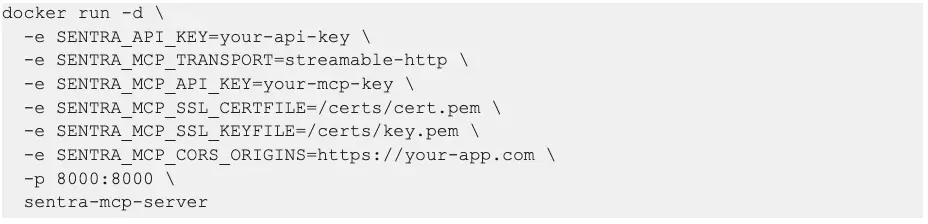
- MCP endpoint authentication via X-MCP-API-Key header for HTTP transport (prevents unauthorized agent connections)
- API key permissions inherit from the Sentra platform -- the MCP server cannot exceed the privileges of the configured API key
Input Validation
- UUID validation on all identifier parameters (alert_id, threat_id, policy_id, class_id) before HTTP calls are made
- Input length limits on all string parameters (1000 chars for comments, 2000 chars for descriptions)
- JSON schema validation for policy creation and tag updates
- Enum validation for status transitions (only valid statuses and reasons accepted)
Network Security
- SSRF protection blocks requests to private IP ranges (169.254.x, 10.x, 172.16-31.x, 192.168.x) and cloud metadata endpoints
- HTTPS enforcement for all non-localhost connections
- TLS-native deployment with certificate and key configuration for direct HTTPS serving
- CORS controls with configurable origin allowlists for HTTP transport
Operational Safety
- Feature flag gating (SENTRA_ENABLE_WRITE_OPS) enables or disables all write operations with a single environment variable
- 6-tier write hierarchy ensures destructive operations require explicit safety confirmation
- Error sanitization strips internal details (hostnames, file paths, stack traces) from error responses returned to clients
- Audit trail -- all write operations are recorded in Sentra's audit log, maintaining full traceability
Container Security
- Docker deployment with non-root user, read-only filesystem, and resource limits
- Health endpoint (/health) for orchestrator readiness probes, accessible without authentication
Deployment Options
Prerequisites
- Python 3.11+ (or Docker)
- Sentra API key with v3 access
- Network access to your Sentra instance (typically https://app.sentra.io)
Quick Start (Claude Desktop)
Add to your Claude Desktop MCP configuration:
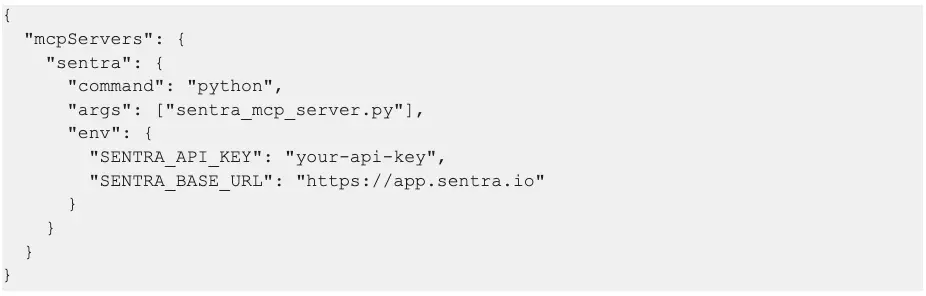
Production Deployment (Docker with TLS)
Configuration Reference
Call to Action
For Existing Sentra Customers
The MCP server is available today. Deploy it alongside your existing Sentra instance and start using natural language to investigate alerts, prepare compliance reports, and manage security operations. Contact your Sentra account team for deployment guidance and best practices.
For Security Teams Evaluating DSPM
The Sentra MCP Server demonstrates what modern data security operations look like: conversational, automated, and end-to-end. Request a demo to see how AI-driven security operations can reduce alert triage time, accelerate compliance preparation, and close the gap from detection to response.
For Security Engineers
The MCP server is open for customization. Add your own tools, create custom prompts that encode your organization's investigation methodologies, and integrate with your existing security workflows. The architecture is designed for extensibility -- every tool registered through the OpenAPI spec is automatically available, and custom tools can be added alongside the auto-generated ones.
The future of data security operations is conversational. Investigate, triage, and resolve -- not just query.
To see Sentra MCP in action Request a Demo
<blogcta-big>
Alejandro is a Technical Account Manager at Sentra with nearly a decade of experience helping enterprises implement and operationalize security platforms. Previously at Salt Security, F5, and Akamai, he has led customer enablement, training, and adoption programs for large enterprise environments. He specializes in helping organizations translate complex security technologies into measurable operational outcomes.