A Practical Maturity Model for AI-Ready Data Security
AI is rapidly reshaping how enterprises create value, but it is also magnifying data risk. Sensitive and regulated data now lives across public clouds, SaaS platforms, collaboration tools, on-prem systems, data lakes, and increasingly, AI copilots and agents.
At the same time, regulatory expectations are rising. Frameworks like GDPR, PCI DSS, HIPAA, SOC 2, ISO 27001, and emerging AI regulations now demand continuous visibility, control, and accountability over where data resides, how it moves, and who - or what - can access it.
Today most organizations cannot confidently answer three foundational questions:
Where is our sensitive and regulated data?
How does it move across environments, regions, and AI systems?
Who (human or AI) can access it, and what are they allowed to do?
This guide presents a three-step maturity model for achieving AI-ready data security using DSPM:
Ensure AI-Ready Compliance through in-environment visibility and data movement analysis
Extend Governance to enforce least privilege, govern AI behavior, and reduce shadow data
Automate Remediation with policy-driven controls and integrations
This phased approach enables organizations to reduce risk, support safe AI adoption, and improve operational efficiency, without increasing headcount.
The Convergence of Data, AI, and Regulation
Enterprise data estates have reached unprecedented scale. Organizations routinely manage hundreds of terabytes to petabytes of data across cloud infrastructure, SaaS platforms, analytics systems, and collaboration tools. Each new AI initiative introduces additional data access paths, handlers, and risk surfaces.
At the same time, regulators are raising the bar. Compliance now requires more than static inventories or annual audits. Organizations must demonstrate ongoing control over data residency, access, purpose, and increasingly, AI usage.
Traditional approaches struggle in this environment:
Infrastructure-centric tools focus on networks and configurations, not data
Manual classification and static inventories can’t keep pace with dynamic, AI-driven usage
Siloed tools for privacy, security, and governance create inconsistent views of risk
The result is predictable: over-permissioned access, unmanaged shadow data, AI systems interacting with sensitive information without oversight, and audits that are painful to execute and hard to defend.
Step 1: Ensure AI-Ready Compliance
AI-ready maturity starts with accurate, continuous visibility into sensitive data and how it moves, delivered in a way regulators and internal stakeholders trust.
Outcomes
A unified view of sensitive and regulated data across cloud, SaaS, on-prem, and AI systems
High-fidelity classification and labeling, context-enhanced and aligned to regulatory and AI usage requirements
Continuous insight into how data moves across regions, environments, and AI pipelines
Best Practices
Scan In-Environment Sensitive data should remain in the organization’s environment. In-environment scanning is easier to defend to privacy teams and regulators while still enabling rich analytics leveraging metadata.
Unify Discovery Across Data Planes DSPM must cover IaaS, PaaS, data warehouses, collaboration tools, SaaS apps, and emerging AI systems in a single discovery plane.
Prioritize Classification Accuracy High precision (>95%) is essential. Inaccurate classification undermines automation, AI guardrails, and audit confidence.
Model Data Perimeters and Movement Go beyond static inventories. Continuously detect when sensitive data crosses boundaries such as regions, environments, or into AI training and inference stores.
What Success Looks Like
Organizations can confidently identify:
Where sensitive data exists
Which flows violate policy or regulation
Which datasets are safe candidates for AI use
Step 2: Extend Governance for People and AI
With visibility in place, organizations must move from knowing to controlling, governing both human and AI access while shrinking the overall data footprint.
Outcomes
Assign ownership to data
Least-privilege access at the data level
Explicit, enforceable AI data usage policies
Reduced attack surface through shadow and ROT data elimination
Governance Focus Areas
Data-Level Least Privilege Map users, service accounts, and AI agents to the specific data they access. Use real usage patterns, not just roles, to reduce over-permissioning.
AI-Data Governance Treat AI systems as high-privilege actors:
Inventory AI copilots, agents, and knowledge bases
Use data labels to control what AI can summarize, expose, or export
Restrict AI access by environment and region
Shadow and ROT Data Reduction Identify redundant, obsolete, and trivial data using similarity and lineage insights. Align cleanup with retention policies and owners, and track both risk and cost reduction.
What Success Looks Like
Sensitive data is accessible only to approved identities and AI systems
AI behavior is governed by enforceable data policies
The data estate is measurably smaller and better controlled
Step 3: Automate Remediation at Scale
Manual remediation cannot keep up with petabyte-scale environments and continuous AI usage. Mature programs translate policy into automated, auditable action.
Outcomes
Automated labeling, access control, and masking
AI guardrails enforced at runtime
Closed-loop workflows across the security stack
Automation Patterns
Actionable Labeling Use high-confidence classification to automatically apply and correct sensitivity labels that drive DLP, encryption, retention, and AI usage controls.
Policy-Driven Enforcement
Examples include:
Auto-restricting access when regulated data appears in an unapproved region
Blocking AI summarization of highly sensitive or regulated data classes
Opening tickets and notifying owners automatically
Workflow Integration Integrate with IAM/CIEM, DLP, ITSM, SIEM/SOAR, and data platforms to ensure findings lead to action, not dashboards.
Benefits
Faster remediation and lower MTTR
Reduced storage and infrastructure costs (often ~20%)
Security teams focus on strategy, not repetitive cleanup
How Sentra and DSPM Can Help
Sentra’s Data Security Platform provides a comprehensive data-centric solution to allow you to achieve best-practice, mature data security. It does so in innovative and unique ways.
Getting Started: A Practical Roadmap
Organizations don’t need a full re-architecture to begin. Successful programs follow a phased approach:
Establish an AI-Ready Baseline Connect key environments and identify immediate violations and AI exposure risks.
Pilot Governance in a High-Value Area Apply least privilege and AI controls to a focused dataset or AI use case.
Introduce Automation Gradually Start with labeling and alerts, then progress to access revocation and AI blocking as confidence grows.
Measure and Communicate Impact Track labeling coverage, violations remediated, storage reduction, and AI risks prevented.
In the AI era, data security maturity means more than deploying a DSPM tool. It means:
Seeing sensitive data and how it moves across environments and AI pipelines
Governing how both humans and AI interact with that data
Automating remediation so security teams can keep pace with growth
By following the three-step maturity model - Ensure AI-Ready Compliance, Extend Governance, Automate Remediation - CISOs can reduce risk, enable AI safely, and create measurable economic value.
Are you responsible for securing Enterprise AI? Schedule a demo
Nikki Ralston is Senior Product Marketing Manager at Sentra, with over 20 years of experience bringing cybersecurity innovations to global markets. She works at the intersection of product, sales, and markets translating complex technical solutions into clear value. Nikki is passionate about connecting technology with users to solve hard problems.
Subscribe
Latest Blog Posts
Alejandro Hernández
March 23, 2026
5
Min Read
Sentra MCP Server: AI-Driven Data Security Operations
Sentra MCP Server: AI-Driven Data Security Operations
The Gap Between Seeing and Doing
Data Security Posture Management has delivered on its promise of visibility. Organizations know where their sensitive data lives, which stores are misconfigured, and how many identities can reach their crown jewels. But a fundamental gap remains: the distance between seeing a security problem and resolving it is still measured in manual steps, context switches, and tribal knowledge.
Security teams spend disproportionate time on operational toil -- navigating dashboards, correlating data across screens, constructing API queries, and manually updating alert statuses. Every alert triage requires the same sequence of clicks. Every compliance audit requires the same series of exports. Every access review requires the same chain of lookups.
The Sentra MCP Server closes this gap by exposing the full breadth and depth of the Sentra platform through the Model Context Protocol (MCP), an open standard that enables AI agents to discover and call tools programmatically. This turns every security operation -- from a simple status check to a multi-step investigation with remediation -- into a natural language conversation.
Unlike read-only MCP implementations that provide a conversational interface to data catalogs, the Sentra MCP Server is a complete security operations platform. It reads, investigates, correlates, and acts. It chains multiple API calls into coherent workflows. And it does so with enterprise-grade safety controls that put security teams in command of what the AI agent can do.
Core thesis: AI-driven DSPM doesn't just tell you what's wrong -- it investigates, triages, and helps you fix it.
How It Works
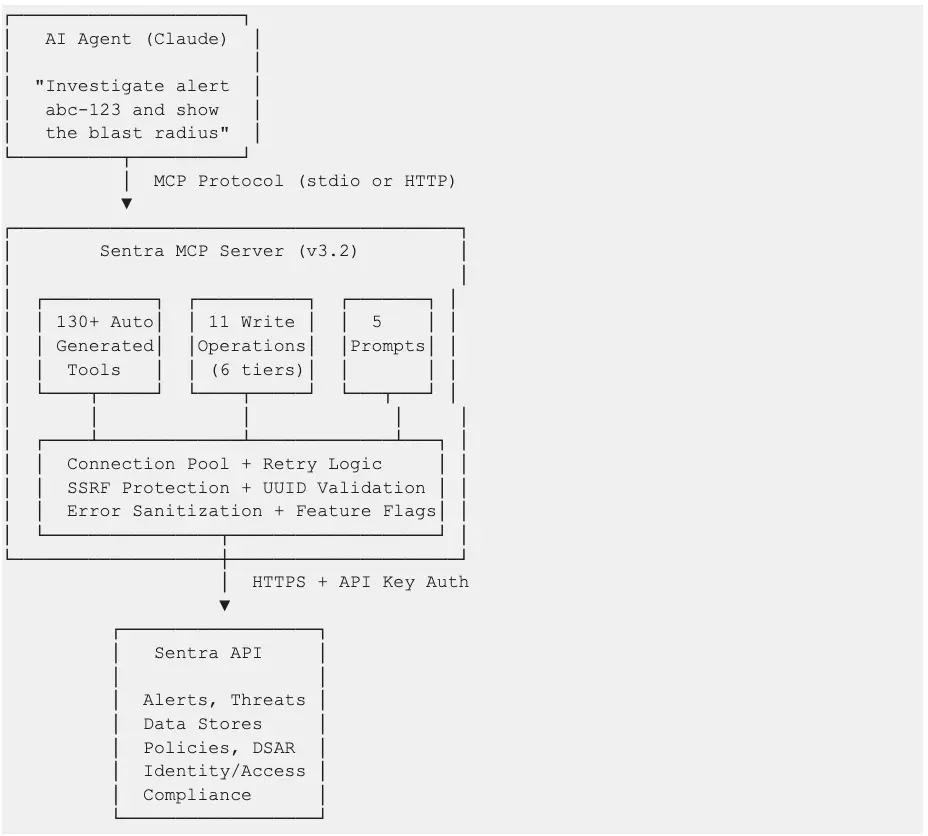
The Sentra MCP Server sits between AI agents (Claude Desktop, Claude Code, Cursor, or any MCP-compatible client) and the Sentra API, translating natural language requests into precise API call chains.
Architecture highlights:
Auto-generated tools: The MCP server parses Sentra's OpenAPI specification at startup and dynamically creates tool wrappers using closures with inspect.Signature -- no code generation or exec() required. This means new API endpoints are automatically exposed as tools when the spec is updated.
Unified request pipeline: All tools -- read and write -- flow through a shared HTTP client with connection pooling, automatic retry with exponential backoff for rate limits (429) and server errors (5xx), and consistent error handling.
Safety-first write operations: Write tools are organized into a 6-tier hierarchy from additive-only to destructive, gated behind a feature flag, with UUID validation and explicit safety confirmations for high-risk operations.
Capability Deep Dive
Read Operations by Domain
The Sentra MCP Server exposes read operations across every domain of the Sentra platform:
Domain
Tool Count
Example Operations
Alerts
~20
List alerts, filter by severity/status, get trends, compliance aggregation, risk ratings, affected assets
Threats
~5
List threats, filter by MITRE tactic, get threat details
Data Stores
~20
Inventory stores, filter by type/region/sensitivity, aggregated risk, scan status, top data classes
Data Assets
~10
Search assets, count by type, export, file extensions, classification findings
Data Insights & Classes
~15
Data class distribution, group by account/region/store type/environment, dictionary values
Identity & Access
~15
Search/count identities, accessible stores/assets, full access graphs, permission metadata
Connectors
~5
List connectors, filter by type, associated connectors
Policies
~5
List policies, filter, incident counts
Compliance
~5
Framework compliance aggregation, control mappings, security ratings, rating trends
List DSAR requests, request details, download reports
AI Assets
~2
List AI/ML assets, asset details
Dashboard & Sensitivity
~3
Dashboard summary, sensitivity overview, scan status
Every tool includes enhanced descriptions that guide the AI agent on when to use it, what parameters to pass, how to construct filters, and what follow-up tools to chain for deeper investigation.
Write Operations: The 6-Tier Hierarchy
Write operations are the key differentiator. They transform the MCP server from a query interface into an operations platform. Each tier represents increasing impact and corresponding safety controls:
All 11 write tools are gated by the SENTRA_ENABLE_WRITE_OPS environment variable (default: enabled). Setting it to false completely removes all write tools from the MCP server, leaving a read-only interface.
Why this matters: Read-only MCP servers can tell you "this policy generates 200 low-severity alerts." The Sentra MCP Server can tell you that and then disable the policy and resolve its alerts -- in the same conversation.
Composite Investigation Tools
Two composite tools chain multiple API calls into single-invocation investigations:
`investigate_alert(alert_id)` -- Full alert triage in one call:
These tools reduce what would be 5-6 sequential API calls into a single invocation, dramatically reducing latency and context window usage for the AI agent.
Guided Workflow Prompts
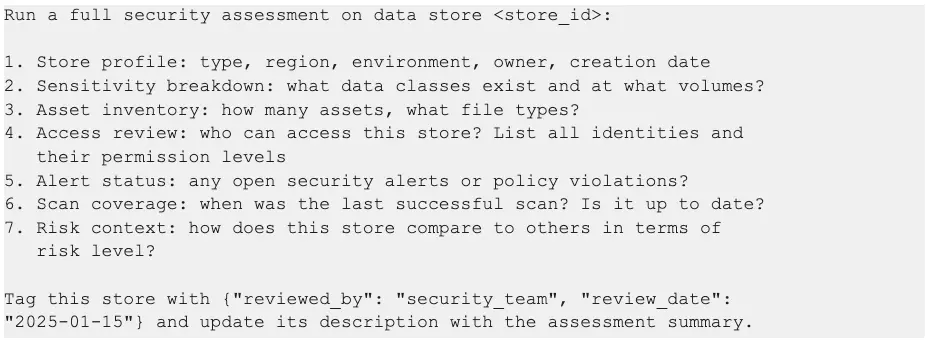
Five MCP prompts provide pre-built, step-by-step instructions that guide the AI agent through complex security workflows:
5-step identity deep dive: details, accessible stores, accessible assets, access graph, related threats
investigate_data_store
store_id
7-step store assessment: details, sensitivity, asset count, access list, alerts, scan status, data classes
Prompts serve as expert runbooks encoded directly into the MCP server. A junior security analyst using these prompts follows the same investigation methodology as a senior engineer.
Use Cases
UC1: Quick Security Status Check
Persona: Security operations analyst starting their shift
Prompt:
"Show me all open alerts by severity and our current security rating."
Value: Instant situational awareness. No dashboard navigation, no login sequence. A 2-second question replaces a 5-minute morning routine.
UC2: Compliance Readiness Assessment
Persona: GRC analyst preparing for an upcoming HIPAA audit
Prompt:
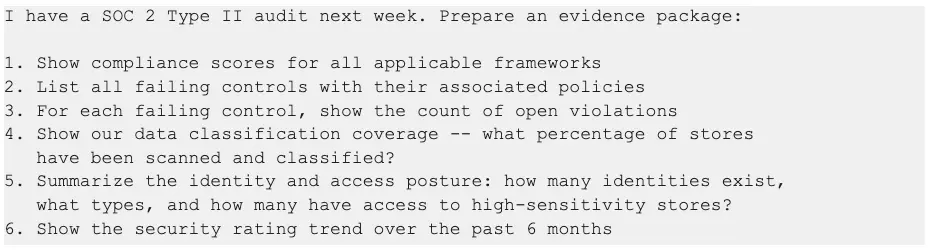
"Prepare HIPAA compliance evidence: show our compliance score, all HIPAA-related controls and their status, any open violations, and data classification coverage for PHI across all data stores."
Value: Audit preparation that typically takes a full day compressed into a single conversational session. The output is structured for direct inclusion in audit evidence packages.
UC3: Alert Triage and Resolution
Persona: Security engineer responding to an overnight alert
Prompt:
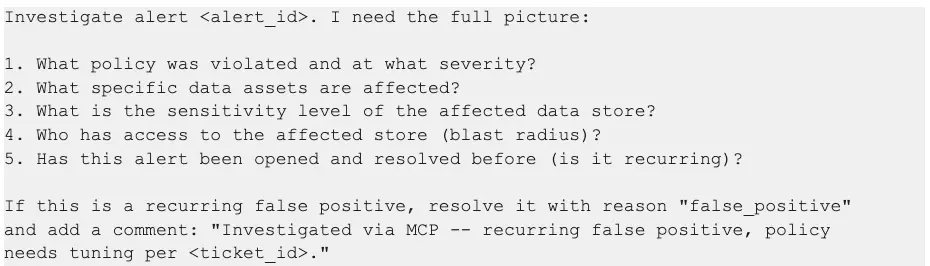
"Investigate alert 7a3f9c21-4b8e-4d2a-9f1c-8e7d6a5b4c3d. Walk me through what happened, what data is at risk, who can access it, and whether this has happened before. If it's a false positive, resolve it and add a comment explaining why."
Value: End-to-end triage and resolution in one conversation. The composite tool gathers all context in a single call, and write operations close the loop -- no need to switch to the Sentra UI.
UC4: Identity Access Review
Persona: Security architect conducting a quarterly access review
Prompt:
"Show me all external identities with access to high-sensitivity data stores. For the identity with the broadest access, map the full access graph from identity to roles to stores to assets. Flag any stores with open alerts."
Tools used: search_identities (filtered), get_data_access_identities_by_id_accessible_stores, get_data_access_identities_by_id_graph, alerts_get_all_external (filtered per store)
Value: Access reviews that require correlating identity data, store sensitivity, role chains, and alert status -- all unified into a single investigation flow. The graph traversal reveals access paths that flat permission reports miss.
UC5: Policy Noise Reduction (Hero Example)
Persona: Security operations lead tuning policy configurations
Prompt:
"Audit all enabled security policies. For each, show how many open alerts it generates and its severity. Identify policies generating more than 50 low-severity alerts -- those are candidates for tuning. For the noisiest policy, show me sample violated assets so I can verify if it's misconfigured. Then disable that policy and resolve its existing alerts as false positives."
Tools used:
policies_get_all -- Retrieve all enabled policies
policies_get_policy_incidents_count -- Alert counts per policy
alerts_get_all_external -- Alerts filtered to the noisiest policy
policy_change_status -- Disable the misconfigured policy (write)
alert_transition -- Resolve existing alerts as false positives (write)
Value: This is the workflow that defines the difference between observing and operating. A read-only MCP server stops at step 4. Sentra's MCP server completes the full audit-to-remediation cycle, reducing policy noise that would otherwise consume analyst hours every week.
UC6: M&A Data Security Due Diligence
Persona: CISO assessing an acquisition target's data security posture
Prompt:
"We're acquiring Company X. Their AWS connector is 'companyX-aws-prod'. Give me a full data security due diligence report: all data stores in that account, sensitivity levels, open alerts and threats, access permissions, and compliance gaps. Flag anything that would be a deal risk."
Value: M&A due diligence that would require a dedicated workstream compressed into a structured assessment. The connector-scoped view ensures the analysis is precisely bounded to the acquisition target's infrastructure.
UC7: Board-Ready Security Briefing
Persona: CISO preparing for a quarterly board presentation
Prompt:
"Prepare my quarterly board security briefing: security rating trend over 90 days, current compliance status by framework, open alerts by severity with quarter-over-quarter comparison, data-at-risk trends, sensitivity summary, and top 5 prioritized recommendations."
Value: Board materials that tell a story: where we were, where we are, what we've improved, and what we need to prioritize next. The AI agent synthesizes data from 6+ tools into a narrative suitable for non-technical audiences.
UC8: AI Data Risk Assessment
Persona: AI governance lead assessing training data risk
Prompt:
"Show me all AI-related assets Sentra has discovered. For each, what sensitive data classes are present, who has access to the training data stores, and are there any open security alerts? Summarize the risk posture for our AI/ML workloads."
Value: As organizations scale AI initiatives, visibility into what sensitive data feeds AI models becomes critical. This workflow surfaces PII, PHI, or proprietary data in training pipelines before it becomes a regulatory or reputational risk.
Prompt Showcase Gallery
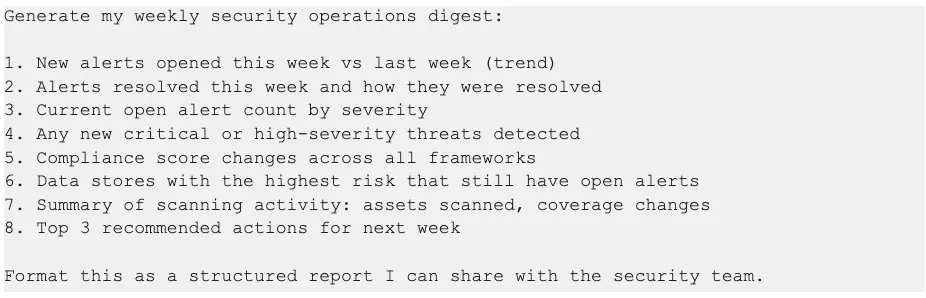
The following prompts are designed to be used directly with any MCP-compatible AI agent connected to the Sentra MCP Server. Each demonstrates a complete workflow with the tools that fire behind the scenes.
Prompt 1: Full Alert Investigation with Remediation
Tools that fire:
alerts_get -- Alert details and policy info
alerts_get_data_assets_by_alert -- Affected data assets
data_stores_get_store -- Store details including sensitivity
Expected output: A multi-section evidence package with quantified compliance metrics, identified gaps, and trend data demonstrating continuous improvement.
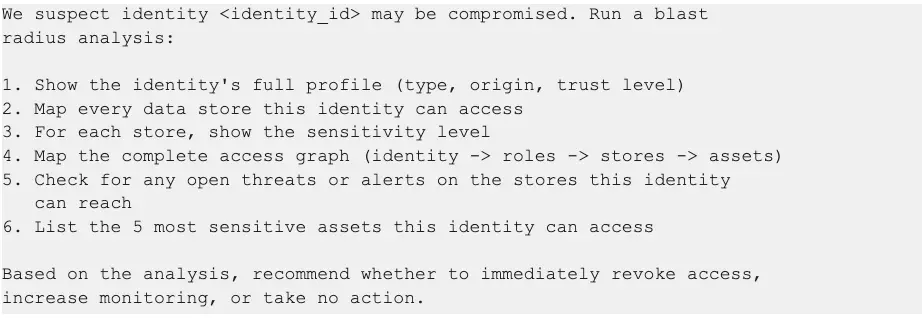
get_data_access_identities_by_id_graph -- Full access graph
threats_get_all_external -- Threats on accessible stores
alerts_get_all_external -- Alerts on accessible stores
get_data_access_identities_by_id_accessible_assets -- Top sensitive assets
Expected output: A risk-scored blast radius report with the identity's complete reach across the data estate, active threats in the blast zone, and a prioritized recommendation.
Expected output: A formatted weekly digest suitable for team distribution, with trend comparisons, prioritized actions, and metrics that track security operations performance.
Competitive Differentiation
Sentra vs. Read-Only Metadata MCP Servers
Dimension
Read-Only MCP Servers
Sentra MCP Server
Tool count
5–20 data catalog tools
130+ tools across 13+ domains
Operations
Read-only queries
Read + 11 write operations
Investigation depth
Single-tool lookups
Multi-step composite investigations
Guided workflows
None
5 pre-built security prompts
Security domains
Data catalog only
Alerts, threats, identity, compliance, DSAR, AI assets, policies, and more
1. Operational depth, not just observational breadth. The 11 write operations across 6 safety tiers transform the MCP server from a query interface into an operations platform. Security teams don't just find problems -- they fix them.
2. Composite investigation tools. The investigate_alert and security_posture_summary tools chain 5-6 API calls into single invocations. This isn't just convenience -- it reduces AI agent round trips, lowers latency, and keeps conversation context focused on analysis rather than data gathering.
3. Guided workflow prompts. Five pre-built prompts encode expert investigation methodologies directly into the MCP server. A junior analyst following the triage_alert prompt performs the same investigation as a senior engineer.
4. Full security domain coverage. From DSAR processing to AI asset risk assessment to MITRE ATT&CK threat mapping to identity graph traversal -- the Sentra MCP Server covers security operations end to end, not just the data catalog slice.
5. Enterprise-grade safety architecture. Write operations aren't an afterthought. The 6-tier hierarchy, feature flag gating, UUID validation, and explicit safety gates (like requiring confirm="PURGE" for destructive operations) ensure that conversational access doesn't compromise operational safety.
Security and Governance
The Sentra MCP Server is designed for enterprise security environments where the tools themselves must meet the same security standards as the data they protect.
Authentication and Authorization
Sentra API authentication via X-Sentra-API-Key header on all outbound API calls
MCP endpoint authentication via X-MCP-API-Key header for HTTP transport (prevents unauthorized agent connections)
API key permissions inherit from the Sentra platform -- the MCP server cannot exceed the privileges of the configured API key
Input Validation
UUID validation on all identifier parameters (alert_id, threat_id, policy_id, class_id) before HTTP calls are made
Input length limits on all string parameters (1000 chars for comments, 2000 chars for descriptions)
JSON schema validation for policy creation and tag updates
Enum validation for status transitions (only valid statuses and reasons accepted)
Network Security
SSRF protection blocks requests to private IP ranges (169.254.x, 10.x, 172.16-31.x, 192.168.x) and cloud metadata endpoints
HTTPS enforcement for all non-localhost connections
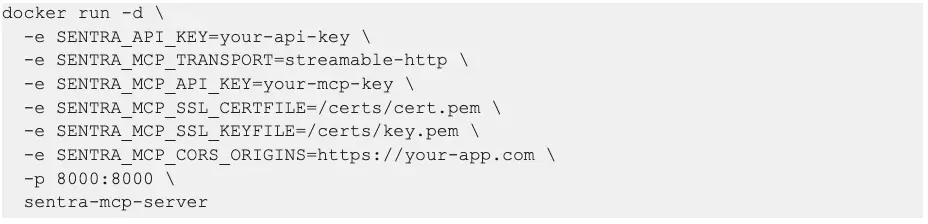
TLS-native deployment with certificate and key configuration for direct HTTPS serving
CORS controls with configurable origin allowlists for HTTP transport
Operational Safety
Feature flag gating (SENTRA_ENABLE_WRITE_OPS) enables or disables all write operations with a single environment variable
Team-shared instance, production security operations
Prerequisites
Python 3.11+ (or Docker)
Sentra API key with v3 access
Network access to your Sentra instance (typically https://app.sentra.io)
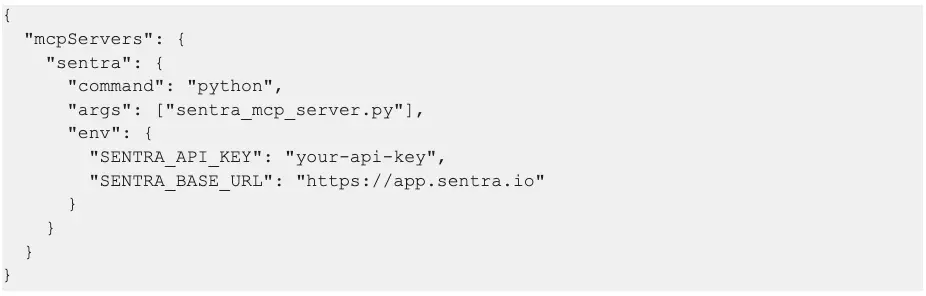
Quick Start (Claude Desktop)
Add to your Claude Desktop MCP configuration:
Production Deployment (Docker with TLS)
Configuration Reference
Environment Variable
Default
Description
SENTRA_API_KEY
(required)
Sentra API key for platform access
SENTRA_BASE_URL
https://app.sentra.io
Sentra API base URL
SENTRA_ENABLE_WRITE_OPS
true
Enable/disable all write operations
SENTRA_MCP_TRANSPORT
stdio
Transport mode: stdio, streamable-http, sse
SENTRA_MCP_API_KEY
(none)
API key required for HTTP transport authentication
SENTRA_MCP_HOST
0.0.0.0
HTTP transport bind address
SENTRA_MCP_PORT
8000
HTTP transport port
SENTRA_MCP_PATH
/mcp
HTTP transport endpoint path
SENTRA_MCP_SSL_CERTFILE
(none)
TLS certificate file path
SENTRA_MCP_SSL_KEYFILE
(none)
TLS private key file path
SENTRA_MCP_CORS_ORIGINS
(none)
Comma-separated allowed CORS origins
SENTRA_MCP_MODE
full
full (all tools) or cursor (priority subset)
Call to Action
For Existing Sentra Customers
The MCP server is available today. Deploy it alongside your existing Sentra instance and start using natural language to investigate alerts, prepare compliance reports, and manage security operations. Contact your Sentra account team for deployment guidance and best practices.
For Security Teams Evaluating DSPM
The Sentra MCP Server demonstrates what modern data security operations look like: conversational, automated, and end-to-end. Request a demo to see how AI-driven security operations can reduce alert triage time, accelerate compliance preparation, and close the gap from detection to response.
For Security Engineers
The MCP server is open for customization. Add your own tools, create custom prompts that encode your organization's investigation methodologies, and integrate with your existing security workflows. The architecture is designed for extensibility -- every tool registered through the OpenAPI spec is automatically available, and custom tools can be added alongside the auto-generated ones.
The future of data security operations is conversational. Investigate, triage, and resolve -- not just query.
Amazon S3 is one of the most widely used cloud storage services in the world, and with that scale comes real security responsibility. Misconfigured buckets remain a leading cause of sensitive data exposure in cloud environments, from accidentally public objects to overly permissive policies that go unnoticed for months. Whether you're hosting static assets, storing application data, or archiving compliance records, getting S3 bucket security right is not optional. This guide covers foundational defaults, policy configurations, and practical checklists to give you an actionable reference as of early 2026.
How S3 Bucket Security Works by Default
A common misconception is that S3 buckets are inherently risky. In reality, all S3 buckets are private by default. When you create a new bucket, no public access is granted, and AWS automatically enables Block Public Access settings at the account level.
Access is governed by a layered permission model where an explicit Deny always overrides an Allow, regardless of where it's defined. Understanding this hierarchy is the foundation of any secure configuration:
IAM identity-based policies, control what actions a user or role can perform
Bucket resource-based policies, define who can access a specific bucket and under what conditions
Access Control Lists (ACLs), legacy object-level permissions (AWS now recommends disabling these entirely)
VPC endpoint policies, restrict which buckets and actions are reachable from within a VPC
AWS recommends setting S3 Object Ownership to "bucket owner enforced," which disables ACLs. This simplifies permission management significantly, instead of managing object-level ACLs across millions of objects, all access flows through bucket policies and IAM, which are far easier to audit.
AWS S3 Security Best Practices
A defense-in-depth approach means layering multiple controls rather than relying on any single setting. Here is the current AWS-recommended baseline:
Practice
Details
Block public access
Enable S3 Block Public Access at both bucket and account levels. Enforce via Service Control Policies (SCPs) in AWS Organizations.
Least-privilege IAM
Grant only specific actions each role needs. Avoid "Action": "s3:*" in production. Use presigned URLs for temporary access. Learn more about AWS IAM.
Encrypt at rest and in transit
Configure default SSE-S3 or SSE-KMS encryption. Enforce HTTPS by denying requests where aws:SecureTransport is false.
Enable versioning & Object Lock
Versioning preserves object history for recovery. Object Lock enforces WORM for compliance-critical data.
Unpredictable bucket names
Append a GUID or random identifier to reduce risk of bucket squatting.
VPC endpoints
Route internal workload traffic through VPC endpoints so it never traverses the public internet.
S3 Bucket Policy Examples for Common Security Scenarios
Bucket policies are JSON documents attached directly to a bucket that define who can access it and under what conditions. Below are the most practically useful examples.
Restrict to a specific VPC endpoint: Use the aws:sourceVpce condition key to ensure the bucket is only reachable from a designated private network.
Grant CloudFront OAI access: Allow only the Origin Access Identity principal, keeping objects private from direct URL access while serving them through the CDN.
IP-based restrictions: Use NotIpAddress with aws:SourceIp to deny requests from outside a trusted CIDR range.
Always use "Version": "2012-10-17" and validate policies through IAM Access Analyzer before deployment to catch unintended access grants.
Enforcing SSL with the s3-bucket-ssl-requests-only Policy
Forcing all S3 traffic over HTTPS is one of the most straightforward, high-impact controls available. The AWS Config managed rule s3-bucket-ssl-requests-only checks whether your bucket policy explicitly denies HTTP requests, flagging non-compliant buckets automatically.
The policy evaluates the aws:SecureTransport condition key. When a request arrives over plain HTTP, this key evaluates to false, and the Deny statement blocks it. This applies to all principals, AWS services, cross-account roles, and anonymous requests alike. Adding the HTTPS-only Deny statement shown in the policy examples section above satisfies both the AWS Config rule and common compliance requirements under PCI-DSS and HIPAA.
Using an S3 Bucket Policy Generator Safely
The AWS Policy Generator is a useful starting point, but generated policies require careful review before going into production. Follow these steps:
Select "S3 Bucket Policy" as the policy type, then fill in the principal, actions, resource ARN, and conditions (e.g., aws:SecureTransport or aws:SourceIp).
Check for overly broad principals, avoid "Principal": "*" unless intentional.
Verify resource ARNs are scoped correctly (bucket-level vs. object-level).
Use IAM Access Analyzer's "Preview external access" feature to understand the real-world effect before saving.
The generator is a scaffold, security judgment still applies. Never paste generated JSON directly into production without review.
S3 Bucket Security Checklist
Use this consolidated checklist to audit any S3 bucket configuration:
Control
Status
Block Public Access
Enabled at account and bucket level
ACLs disabled
Object Ownership set to "bucket owner enforced"
Default encryption
SSE-S3 or SSE-KMS configured
HTTPS enforced
Bucket policy denies aws:SecureTransport: false
Least-privilege IAM
No wildcard actions in production policies
Versioning
Enabled; Object Lock for sensitive data
Bucket naming
Includes unpredictable identifiers
VPC endpoints
Configured for internal workloads
Logging & monitoring
Server access logging, CloudTrail, GuardDuty, and IAM Access Analyzer active
AWS Config rules
s3-bucket-ssl-requests-only and related rules enabled
Disaster recovery
Cross-region replication configured where required
How Sentra Strengthens S3 Bucket Security at Scale
Applying the right bucket policies and IAM controls is necessary, but at enterprise scale, knowing which buckets contain sensitive data, how that data moves, and who can access it becomes the harder problem. This is where cloud data exposure typically occurs: not from a single misconfigured bucket, but from data sprawl across hundreds of buckets that no one has a complete picture of.
Sentra discovers and classifies sensitive data at petabyte scale directly within your environment, data never leaves your control. It maps data movement across S3, identifies shadow data and over-permissioned buckets, and enforces data-driven guardrails aligned with compliance requirements. For organizations adopting AI, Sentra provides the visibility needed to ensure sensitive training data or model outputs in S3 are properly governed. Eliminating redundant and orphaned data typically reduces cloud storage costs by around 20%.
S3 bucket security is not a one-time configuration task. It's an ongoing practice spanning access control, encryption, network boundaries, monitoring, and data visibility. The controls covered here, from enforcing SSL and disabling ACLs to using policy generators safely and maintaining a security checklist, give you a comprehensive framework. As your environment grows, pairing these technical controls with continuous data discovery ensures your security posture scales with your data, not behind it.
Read More
Nikki Ralston
March 15, 2026
4
Min Read
How to Evaluate DSPM and DLP for Copilot and Gemini: A Security Architect’s Buyer’s Guide
How to Evaluate DSPM and DLP for Copilot and Gemini: A Security Architect’s Buyer’s Guide
Most security architects didn’t sign up to be AI product managers. Yet that’s what Copilot and Gemini rollouts feel like: “We want this in every business unit, as soon as possible. Make sure it’s safe.”
If you’re being asked to recommend or validate a DSPM platform, or to justify why your existing DLP stack is or isn’t enough, you need a realistic, vendor‑agnostic set of criteria that maps to how Copilot and Gemini actually work.
This guide is written from that perspective: what matters when you evaluate DSPM and DLP for AI assistants, what’s table stakes vs. differentiating, and what you should ask every vendor before you bring them to your steering committee.
1. Start with the AI use cases you actually have
Before you look at tools, clarify your Copilot and/or Gemini scope:
Are you rolling out Microsoft 365 Copilot to a pilot group, or planning an org‑wide deployment?
Are you enabling Gemini in Workspace only, or also Gemini for dev teams (Vertex AI, custom LLM apps, RAG)?
Do you have existing AI initiatives (third‑party SaaS copilots, homegrown assistants) that will access M365 or Google data?
This matters because different tools have very different coverage:
Some are M365‑centric with shallow Google support.
Others focus on cloud infrastructure and data warehouses, and barely touch SaaS.
Very few provide deep, in‑environment visibility across both SaaS and cloud platforms, which is what you need if Copilot/Gemini are just the tip of your AI iceberg.
Define the boundary first; evaluate tools second.
2. Non‑negotiable DSPM capabilities for Copilot and Gemini
When Copilot and Gemini are in scope, “generic DSPM” is not enough. You need specific capabilities that touch how those assistants see and use data.
2.1 Native visibility into M365 and Workspace
At minimum, a viable DSPM platform must:
Discover and classify sensitive data across SharePoint, OneDrive, Exchange, Teams and Google Drive / shared drives.
Understand sharing constructs (public/org‑wide links, external guests, shared drives) and relate them to data sensitivity.
Support unstructured formats including Office docs, PDFs, images, and audio/video files.
Ask vendors:
“Show me, live, how you discover sensitive data in Teams chats and OneDrive/Drive folders that are Copilot/Gemini‑accessible.”
“Show me how you handle PDFs, audio, and meeting recordings - not just Word docs and spreadsheets.”
Sentra, for example, was explicitly built to discover sensitive data across IaaS, PaaS, SaaS, and on‑prem, and to handle formats like audio/video and complex PDFs as first‑class sources.
2.2 In‑place, agentless scanning
For many organizations, it’s now a hard requirement that data never leaves their cloud environment for scanning. Evaluate if the vendor scan in‑place within your tenants, using cloud APIs and serverless functions or do they require copying data or metadata into their infrastructure?
Sentra’s architecture is explicitly “data stays in the customer environment”, which is why large, regulated enterprises have standardized on it.
2.3 AI‑grade classification accuracy and context
Copilot and Gemini are only as safe as your labels and identity model. That requires:
High‑accuracy classification (>98%) across structured and unstructured content.
The ability to distinguish synthetic vs. real data and to attach rich context: department, geography, business function, sensitivity, owner.
Ask:
“How do you measure classification accuracy, and on what datasets?”
“Can you show me how your platform treats, for example, a Zoom recording vs. a scanned PDF vs. a CSV export?”
Sentra uses AI‑assisted models and granular context classes at both file and entity level, which is why customers report >98% accuracy and trust the labels enough to drive enforcement.
3. Evaluating DLP in an AI‑first world
Most enterprises already have DLP: endpoint, email, web, CASB. The question is whether it can handle AI assistants and the honest answer is that DLP alone usually can’t, because:
It operates blind to real data context, relying on regex and static rules.
It usually doesn’t see unstructured SaaS stores or AI outputs reliably.
Policies quickly become so noisy that they get weakened or disabled.
The evaluation question is not “DLP or DSPM?” It’s:
“Which DSPM platform can make my DLP stack effective for Copilot and Gemini, without a rip‑and‑replace?”
Look for:
Tight integration with Microsoft Purview (for MPIP labels and Copilot DLP) and, where relevant, Google DLP.
The ability to auto‑apply and maintain labels that DLP actually enforces.
Support for feeding data context (sensitivity + business impact + access graphs) into enforcement decisions.
Sentra becomes the single source of truth for sensitivity and business impact that existing DLP tools rely on.
4. Scale, performance, and operating cost
AI rollouts increase data volumes and usage faster than most teams expect. A DSPM that looks fine on 50 TB may struggle at 5 PB.
Evaluation questions:
“What’s your largest production deployment by data volume? How many PB?”
“How long does an initial full scan take at that scale, and what’s the recurring scan pattern?”
“What does cloud compute spend look like at 10 PB, 50 PB, 100 PB?”
Sentra customer tests prove ability to scan 9 PB in under 72 hours at 10–1000x greater scan efficiency than legacy platforms, with projected scanning of 100 PB at roughly $40,000/year in cloud compute.
If a vendor can’t answer those questions quantitatively, assume you’ll be rationing scans, which undercuts the whole point of DSPM for AI.
5. Governance, reporting, and “explainability” for architects
Your stakeholders, security leadership, compliance, boards, will ask three things:
“Where, exactly, can Copilot and Gemini see regulated data?”
“How do we know permissions and labels are correct?”
“Can you prove we’re compliant right now, not just at audit time?”
A strong DSPM platform helps you answer those questions without building custom reporting in a SIEM:
AI‑specific risk views that show AI assistants, datasets, and identities in one place.
Compliance mappings to frameworks like GLBA, SOX, FFIEC, GDPR, HIPAA, PCI DSS, and state privacy laws.
Executive‑ready summaries of AI‑related data risk and progress over time (e.g., percentage of regulated data coverage, number of Copilot‑accessible high‑risk stores before vs. after remediation).
When you boil it down, your evaluation criteria for DSPM/DLP for Copilot and Gemini should include:
In‑place, multi‑cloud/SaaS discovery with strong M365 and Workspace coverage
Proven high‑accuracy classification and rich business context for unstructured data
Identity‑to‑data mapping with least‑privilege insights
Native integrations with MPIP/Purview and Google DLP, with label automation
Real‑world scale (PB‑level) and quantified cloud cost
AI‑aware risk views, compliance mappings, and reporting
Use those as your “table stakes” in RFPs and technical deep dives. You can add vendor‑specific questions on top, but if a tool can’t clear this bar, it will not make Copilot and Gemini genuinely safe - it will just give you more dashboards.
<blogcta-big>
Read More
Expert Data Security Insights Straight to Your Inbox
What Should I Do Now:
1
Get the latest GigaOm DSPM Radar report - see why Sentra was named a Leader and Fast Mover in data security. Download now and stay ahead on securing sensitive data.
2
Sign up for a demo and learn how Sentra’s data security platform can uncover hidden risks, simplify compliance, and safeguard your sensitive data.
3
Follow us on LinkedIn, X (Twitter), and YouTube for actionable expert insights on how to strengthen your data security, build a successful DSPM program, and more!
Before you go...
Get the Gartner Customers' Choice for DSPM Report
Read why 98% of users recommend Sentra.
This website uses cookies to improve your experience and provide personalized services. See our Privacy Policy and Cookie Policy. We won't track your information unless you accept.




.webp)